Free for Mac and PC
Sound system design, prediction and optimisation for Martin Audio systems
DISPLAY 3 takes you from venue model to deployed system. Import a venue from SketchUp, then place and predict Martin Audio point-source, line-array and subwoofer systems, and see the results mapped in 3D. For Wavefront Precision line arrays, DISPLAY 3 goes further with Martin Audio Optimisation. This calculates the array angles and DSP needed to deliver the coverage you’ve defined, accurate to within ±1dB of measured performance.
What you see is what you hear.
Learn about DISPLAY 3 with this 5-minute walk-through video.
Across the Martin Audio portfolio
Design and prediction
DISPLAY 3 is quick to learn and quick to work with. It covers system design and prediction across the Martin Audio portfolio:
- Import detailed venue models from SketchUp, or build simple venues and shapes directly in DISPLAY 3.
- Work with the layers inherited from SketchUp, and hide any surfaces you don’t need.
- Assign coverage to individual surfaces, or to every surface on a layer in one step.
- Set standing, seated or custom audience heights for different areas.
- Map SPL results onto the 3D model.
- Design ground-deployed linear subwoofer arrays with the subwoofer array tool.
- Mirror arrays across a symmetrical venue with the Symmetry Tool.
- Export rigging information to PDF.
- Run it on Mac or PC.
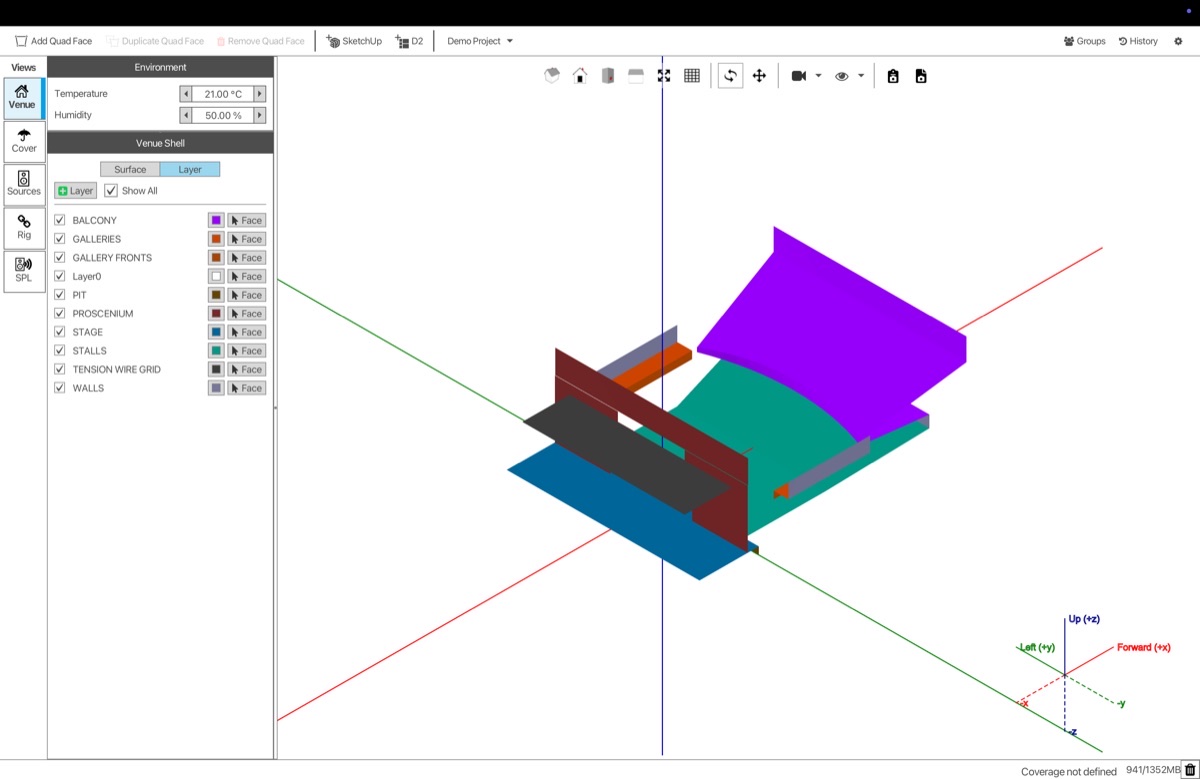
Import a venue from SketchUp, with its layers.
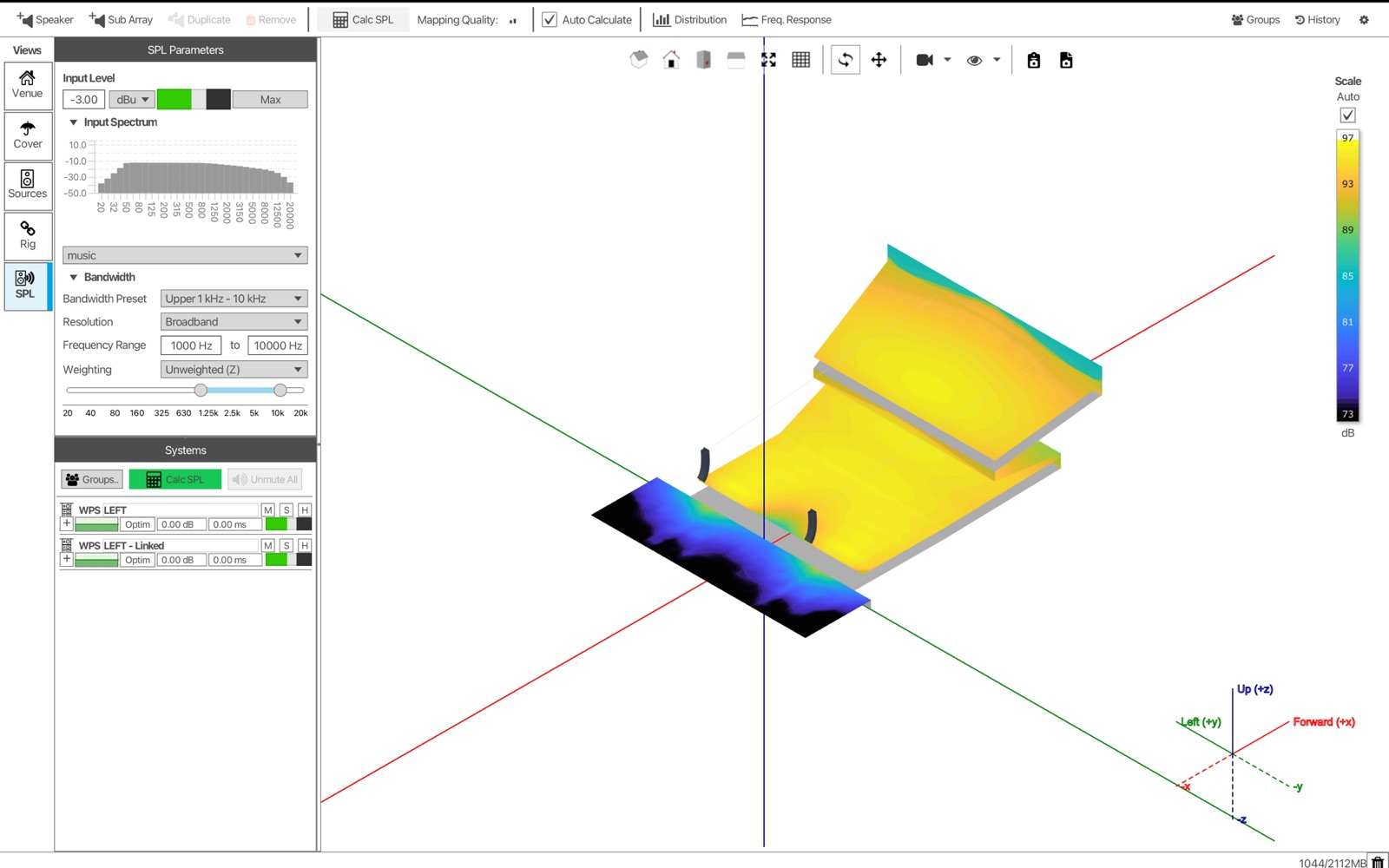
SPL results mapped onto the 3D venue.
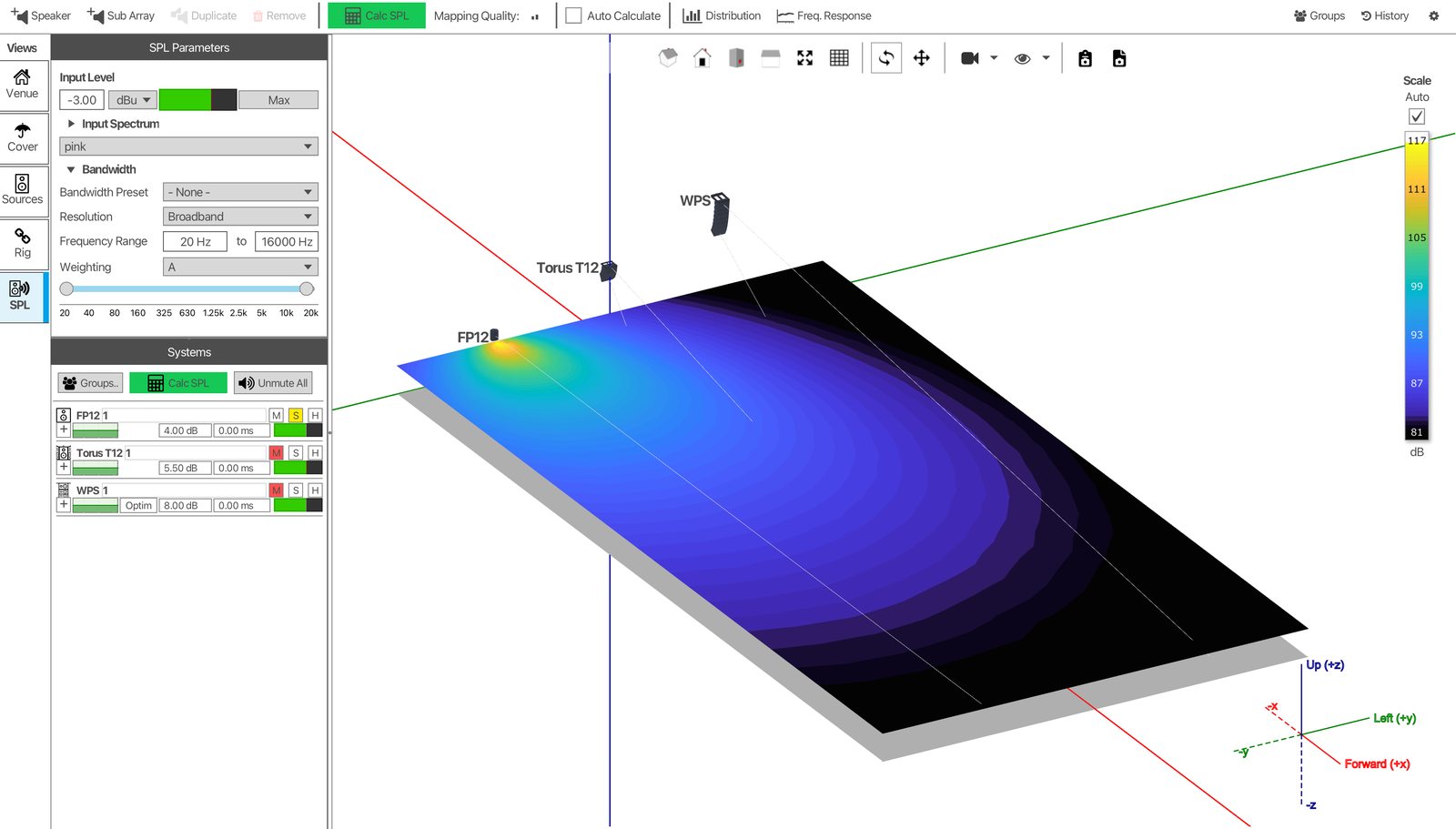
Point source: FlexPoint FP12
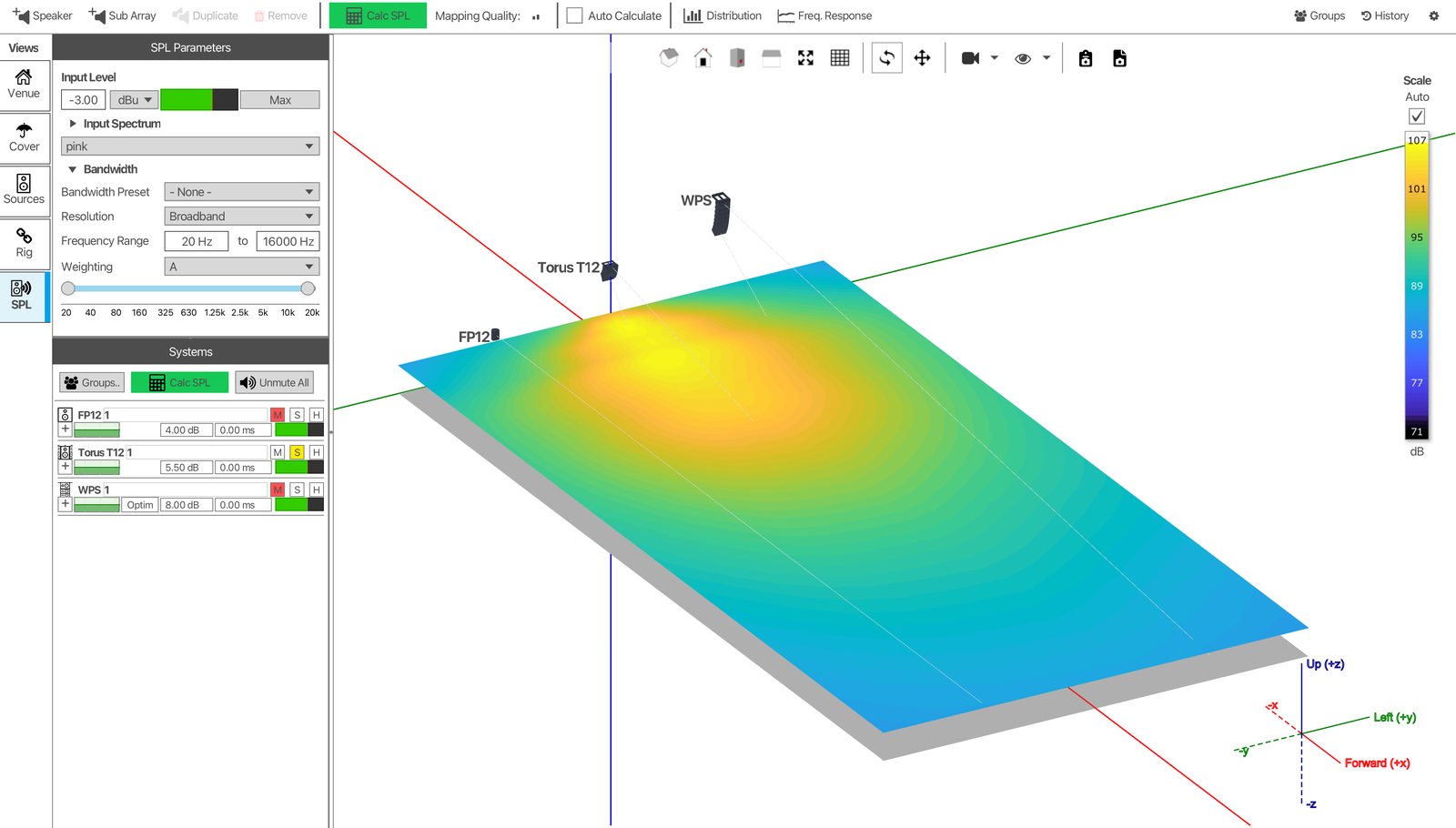
Constant curvature: TORUS T12
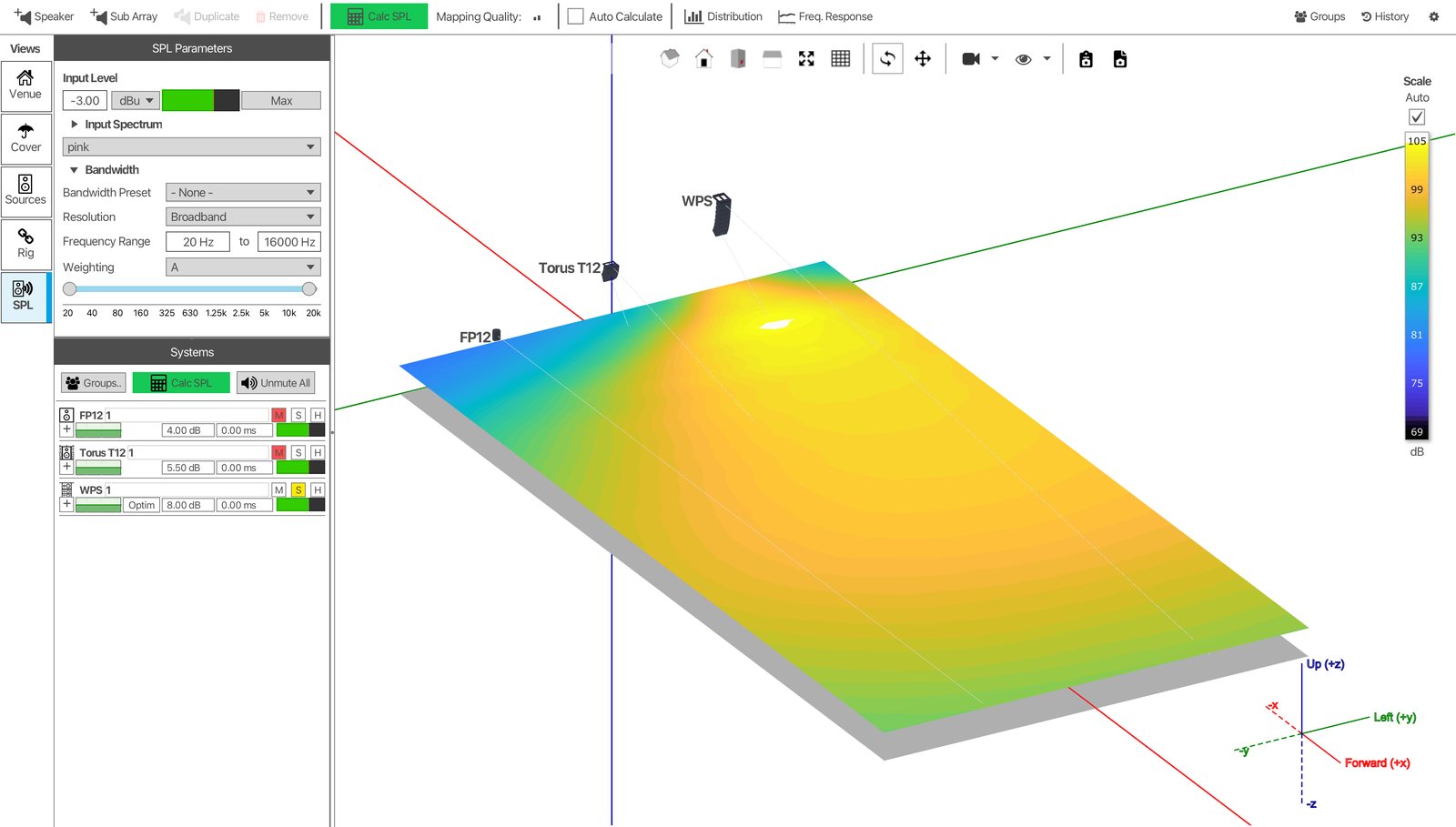
Line array: Wavefront Precision WPS
Point-source, constant-curvature and line-array systems predicted in the same venue.
Start with the audience
Martin Audio Optimisation
For Wavefront Precision line array systems, DISPLAY 3 adds Martin Audio Optimisation, a process to deliver the optimum combination of inter-cabinet angles and DSP filtering for the result you’ve defined.
Because the audience experience is central to our philosophy, this process starts with the audience, not the loudspeaker.
-
Coverage
Sound summation at the audience plane, from the front row to the back. You set the SPL profile you want across the audience, and Martin Audio Optimisation matches the array performance to deliver it, accounting for throw distance and air attenuation along the way.
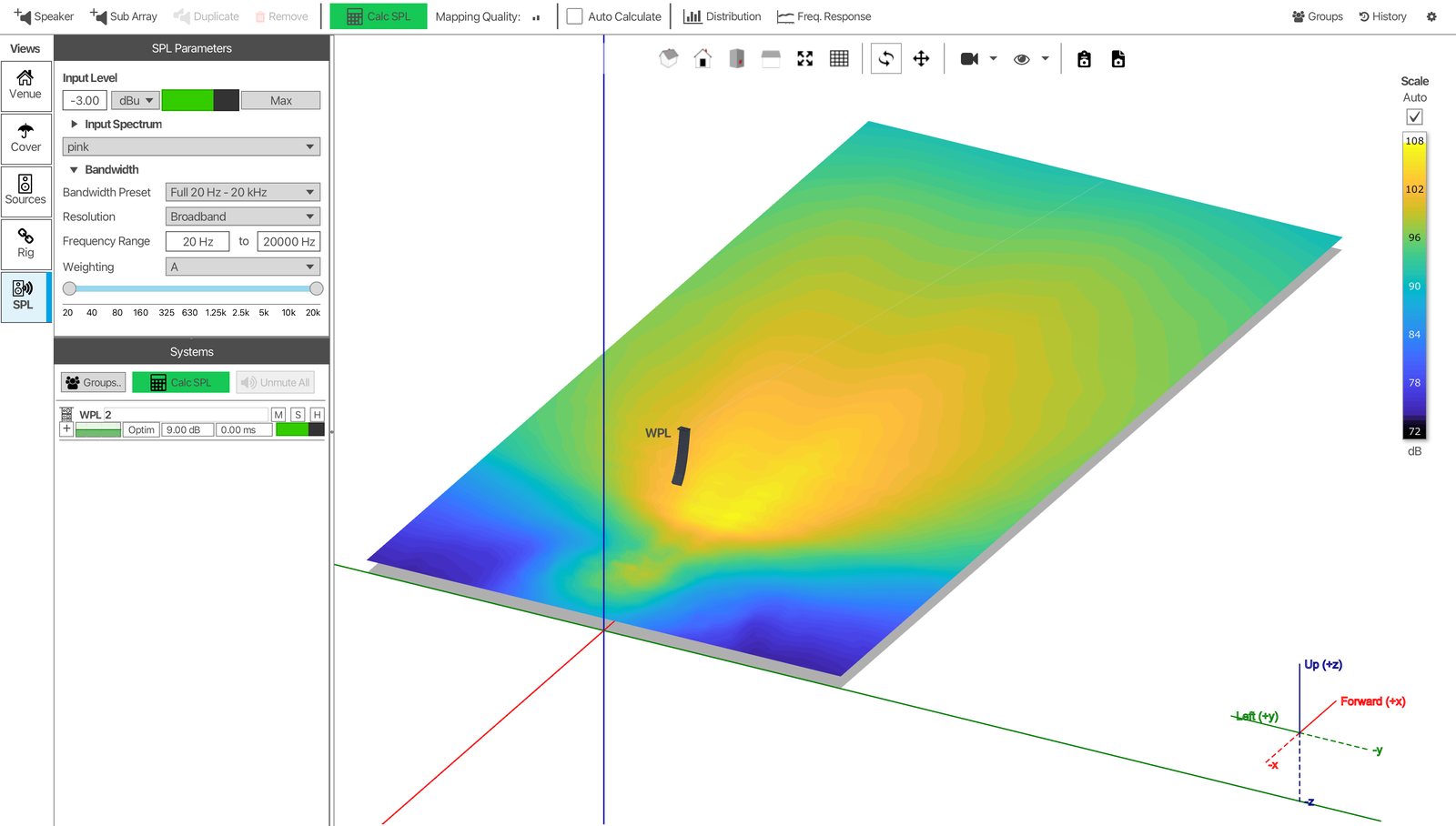
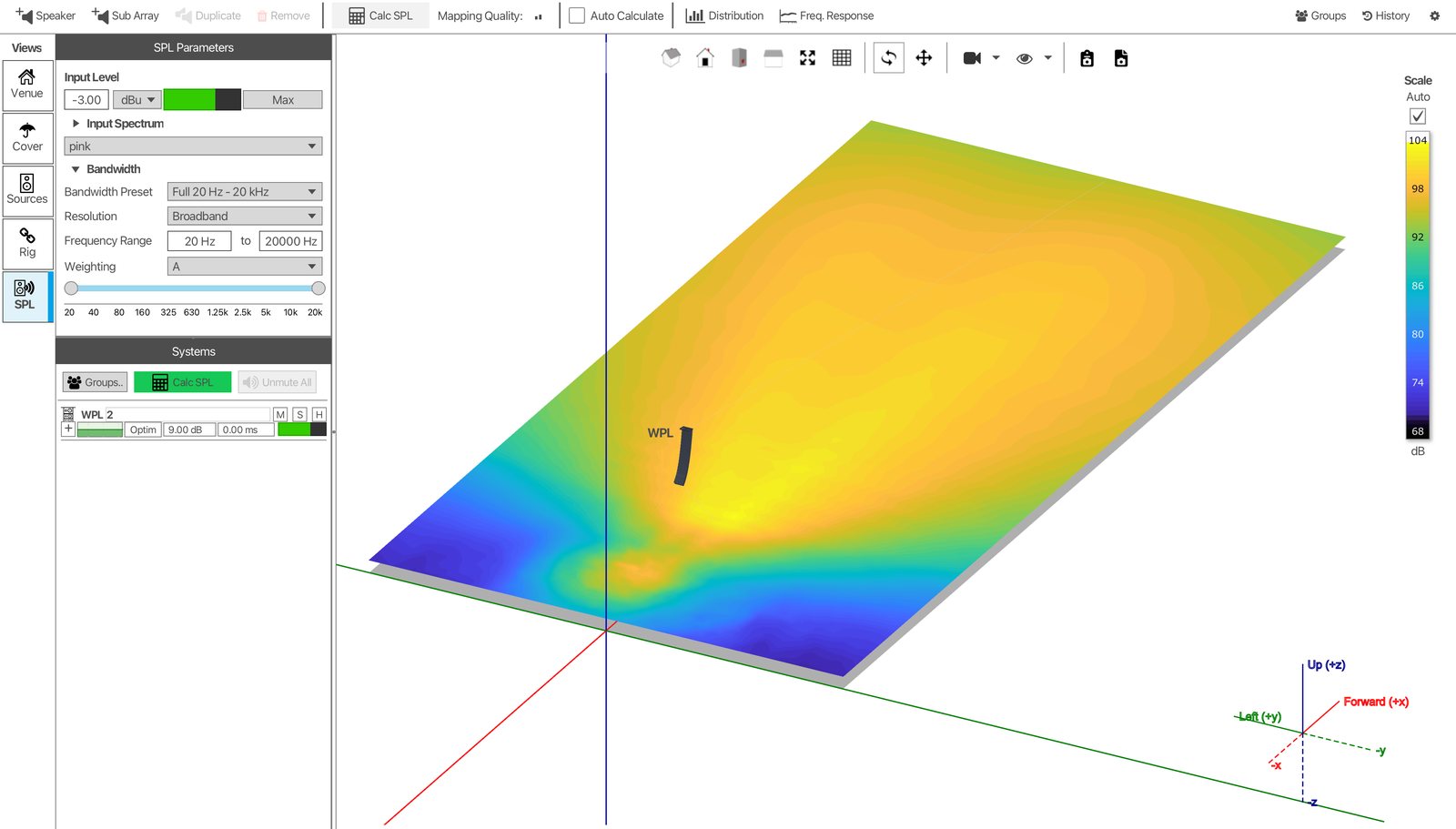
Left: a typical 6dB roll-off from front to back. Right: optimised to a +1/−2dB profile.
-
Control
Sound where it’s needed, and nowhere else. Energy is kept off walls, ceilings and the stage, and away from neighbours in an open-air site to meet noise control limits.
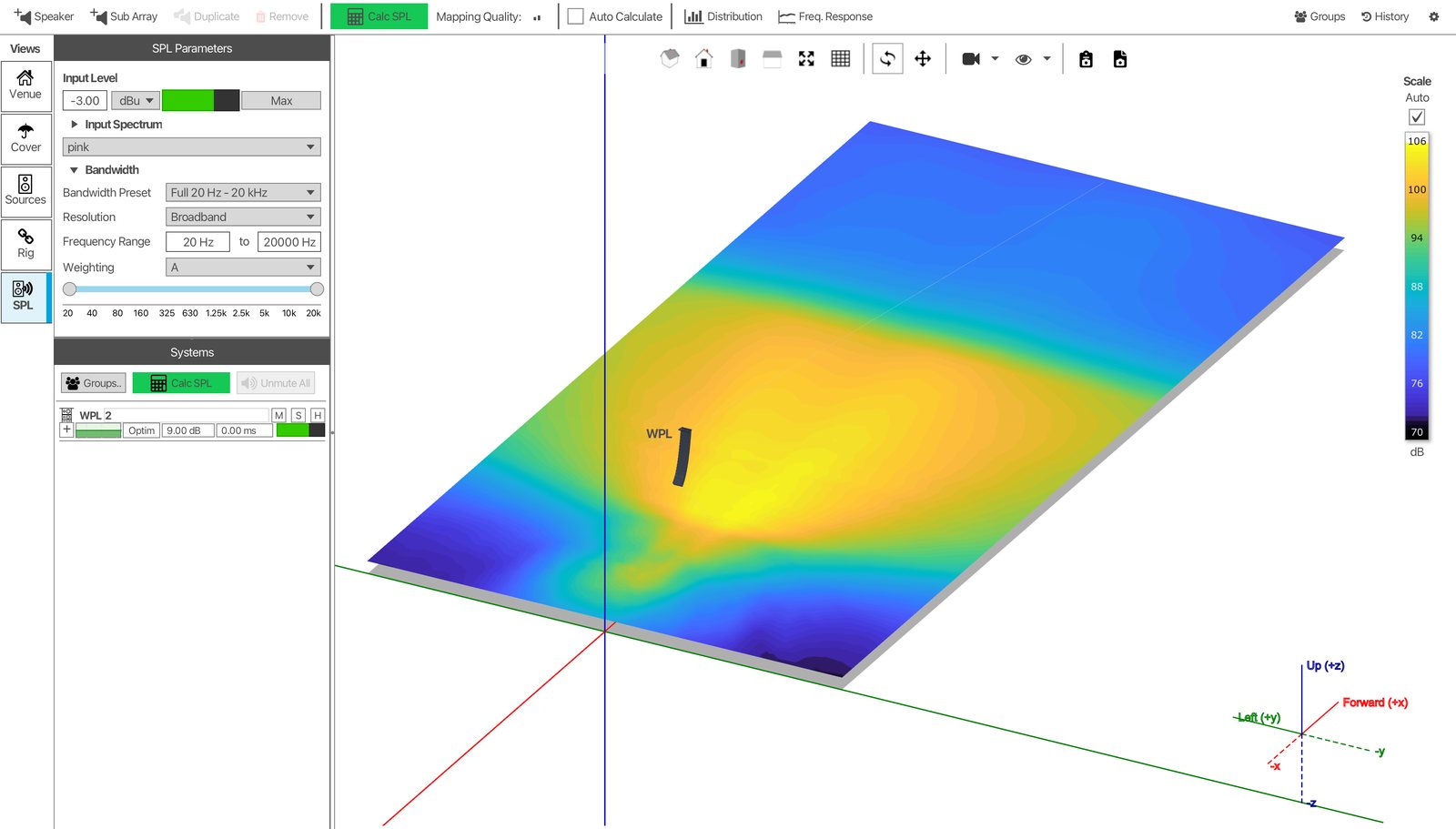
Hard Avoid in action: level drops sharply beyond the audience.
-
Consistency
Improved consistency of frequency response across the audience. Martin Audio Optimisation evaluates 391 frequencies, so tonality stays balanced from front to back.
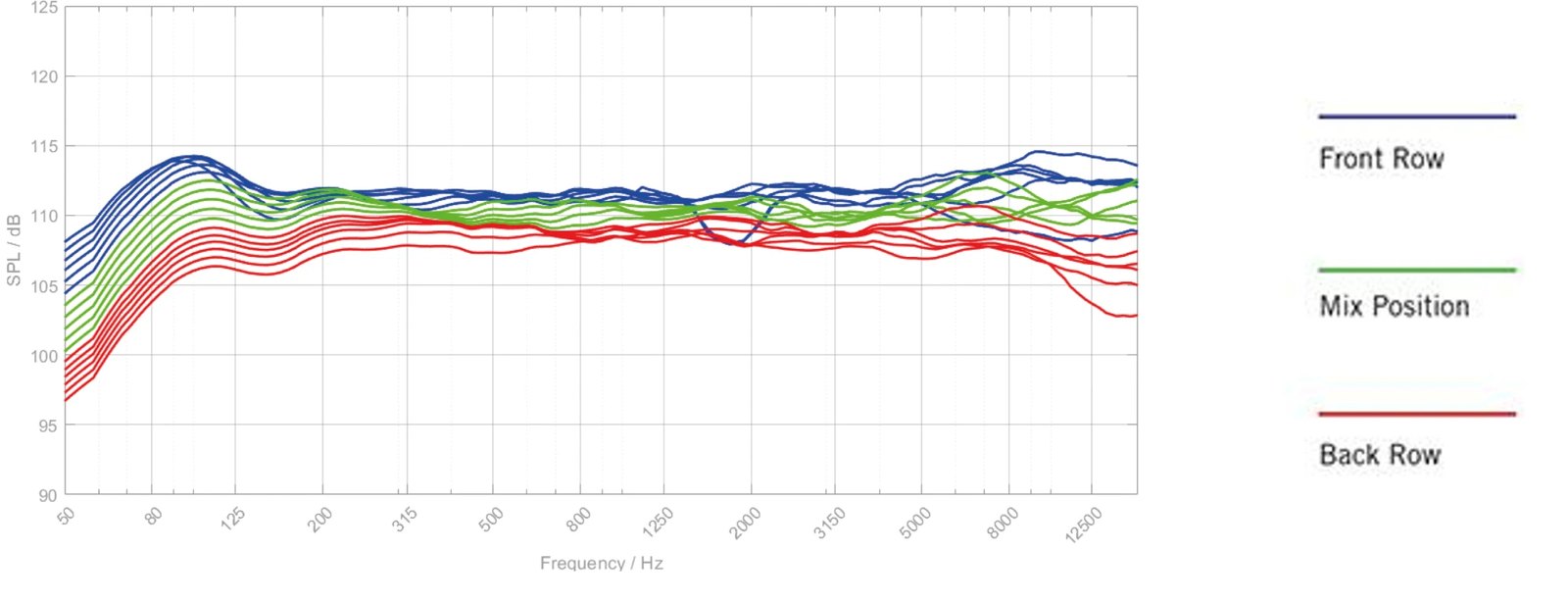
An even frequency response across the audience.
Set your priorities
Tell Martin Audio Optimisation what matters
The process places the user in control to divide the space into target areas, and DISPLAY 3 solves for the result you’ve asked for in each one. Use as many or as few target types as the design needs.
Reference SPL
Audience
The areas you want covered. Set a reference SPL at a single position, then bias the level at the front and back of the area to shape the profile from front to back. The aim is coherent, even summation throughout the direct field.
Up to −20dB
Avoid
A broad constraint that reduces level by up to 20dB relative to the reference. Avoid areas also mark the edges of the audience. They keep energy off walls, ceilings and balcony fronts, so less of it feeds the reverberant field.
Up to −30dB
Hard Avoid®
For areas where level needs to come down sharply, by up to 30dB relative to the reference. Typical uses are the stage, where it improves gain before feedback, the space beyond an open-air audience, where it helps control off-site noise, or a specific hard reflective surface. Use Hard Avoid once per deployment, with Avoid for other areas.
Ignored
Don’t Care
Areas that aren’t acoustically significant. The optimisation algorithm ignores them, so it doesn’t spend processing or headroom on places nobody is listening.
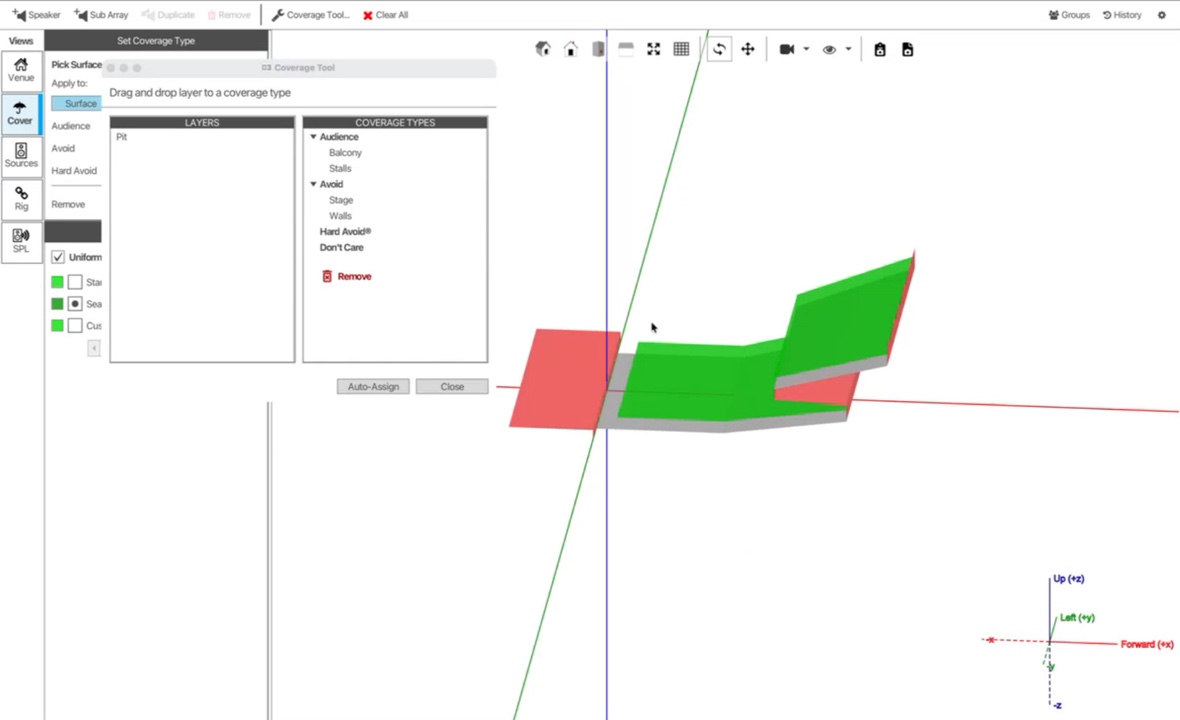
The Coverage Tool: drag layers onto coverage types.
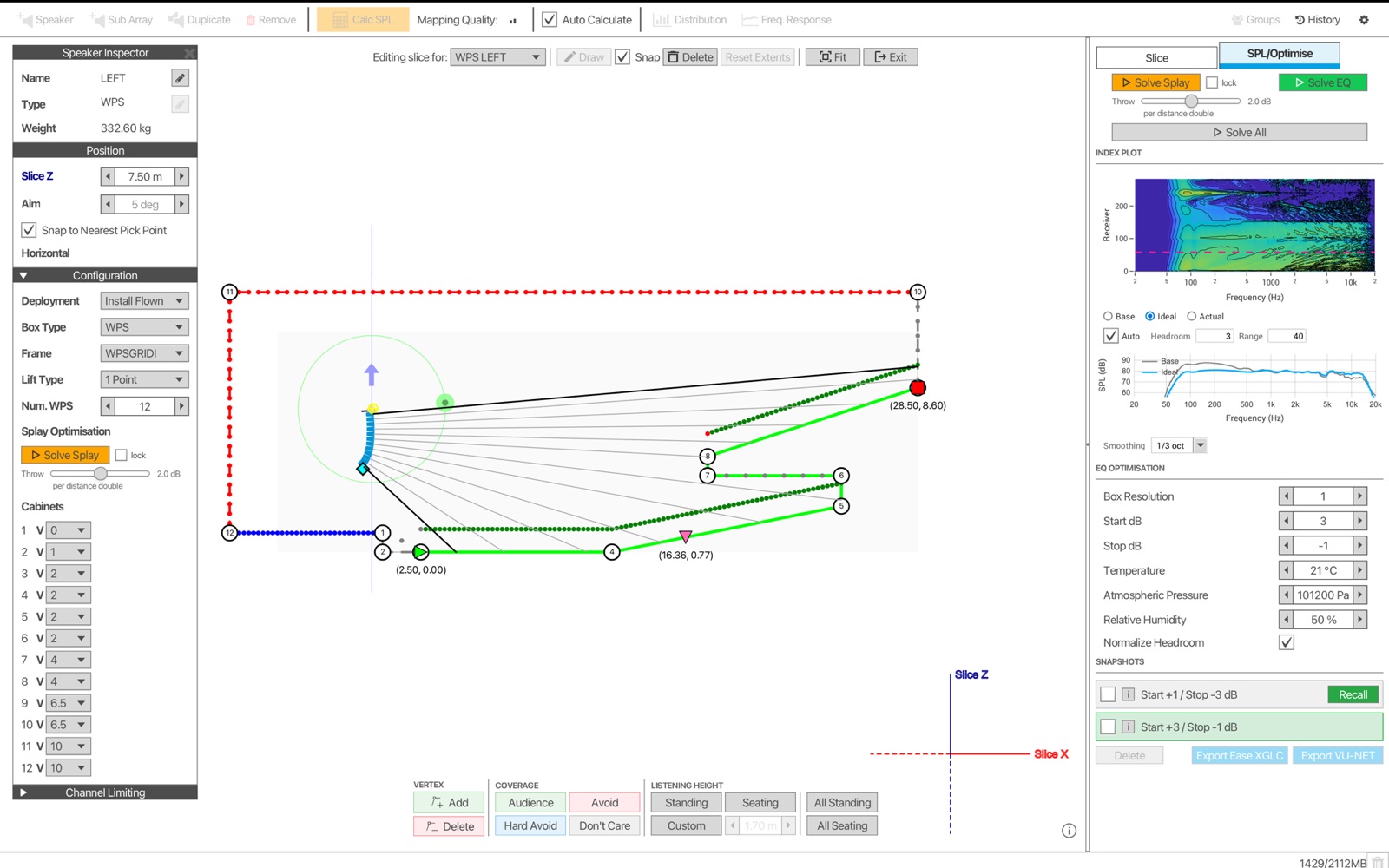
Solve Splay and Solve EQ on the venue slice, with snapshots saved.
How the optimisation works
DISPLAY 3 doesn’t chase a single ideal target. It looks at the outcome at every listening position and solves for the whole array at once.
- 391 individual frequencies evaluated
- Direct SPL, magnitude and phase calculated for every cabinet in the array
- Multiple listening points at varying distances across each audience area
- Typically under 20 seconds per array, depending on size and complexity
- Accurate to within ±1dB of measured performance
The calculation takes account of:
- the length and curvature of the array, and the interaction between its sources
- the directivity of each cabinet, based on BEM acoustic modelling
- the distance and off-axis angle from the array to each listening point
- air attenuation at each position, adjusted for humidity and pressure
Optimisation works in two stages
Angles
First, DISPLAY 3 sets the inter-cabinet angles to give the array the right acoustic foundation for your targets.
FIR filters
Then FIR filters bring phase, magnitude and SPL into line, which improves low-frequency control and keeps tonality even throughout the audience.
Optimisation is vertical. Horizontal dispersion is set by the cabinet you choose. You can save multiple optimisation snapshots to cover changes in audience size or environmental conditions.

Not all optimisation is created equal
What sets Martin Audio Optimisation apart from other processing solutions is the retention of audio quality while delivering coverage, consistency and control. It is about precision and transparency, not homogenisation. DISPLAY 3 works with the physics of the array, not against them. It aims to preserve the source in its natural state and focuses on the outcome at the listener.
Constraints are built into the algorithm, so no target is chased at the expense of the others.
Mechanical angles are set first, so the FIR filters refine the result rather than rescue it.
Don’t Care areas stop processing and headroom being spent where nobody is listening.
The result is the signature Martin Audio musicality, delivered to every audience member without over-processing.
“It’s fantastic to step up and not feel like you have to fight or over-process the PA.”
Martin Audio Optimisation case studies
Optimisation in the field

We had to control sound escape outside the venue to an unprecedented level, but with Martin Audio’s DISPLAY optimisation software the results were easy to obtain. Inside the audience field the audio experience was completely different to outside the perimeter. It was amazing how much sound pressure and quality was provided to avoid it leaking out.
Touring
-
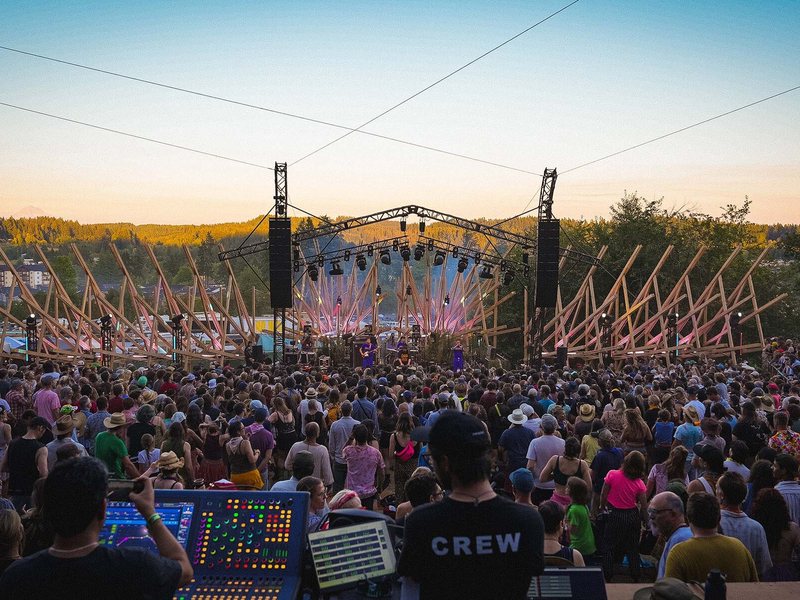
Pickathon Festival, Oregon
WPC, WPM and WPS · Cascade Sound
Expanding residential neighbourhoods made off-site noise the festival’s top priority. Topographical data was imported into DISPLAY 3, and Hard Avoid and the SPL profile were used to keep sound on the audience and away from the neighbours, across every outdoor stage.
“The sound went exactly where we wanted it.”
-
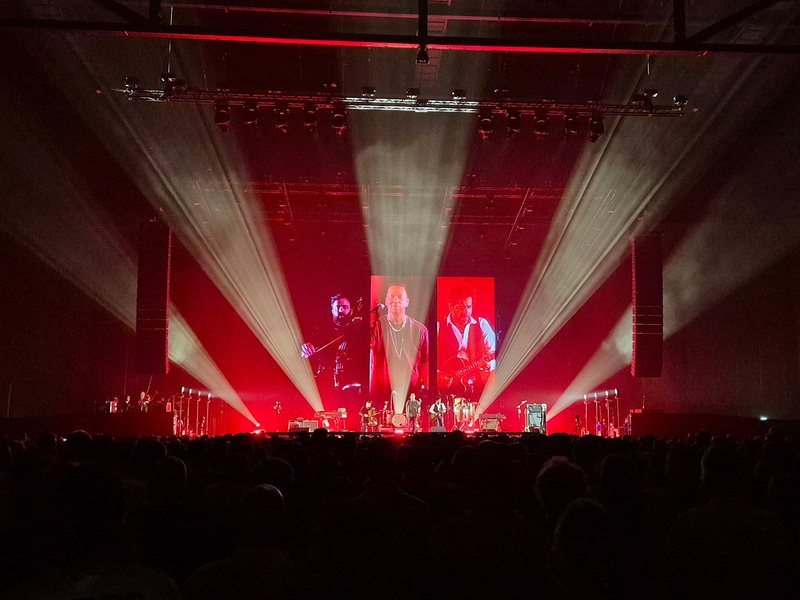
Van Dik Hout tour, DSL
WPL · AFAS Live, Amsterdam and on tour
Every venue on the tour was different, from theatres to festival stages, but the sound had to stay the same. Optimising individual enclosures gave DSL consistent SPL and frequency response from the front row to the rear, wherever the band played.
“The correlation between the software model and real-world performance is remarkably accurate.”
Installation
-
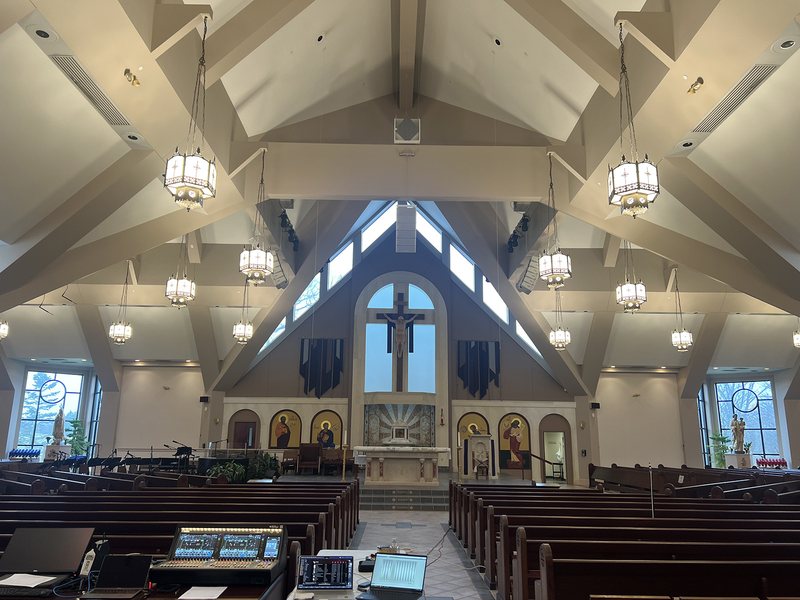
Christ the King Church, Michigan
WPM · Annunciation Audio-Visual Services
A reverberant church with three naves fanning out from a central space, where the old system left some seats poorly covered. Three optimised WPM clusters keep energy off reflective surfaces, so the sanctuary now sounds as loud as halfway back in the church.
“The first time the feedback has been 100% positive.”
-
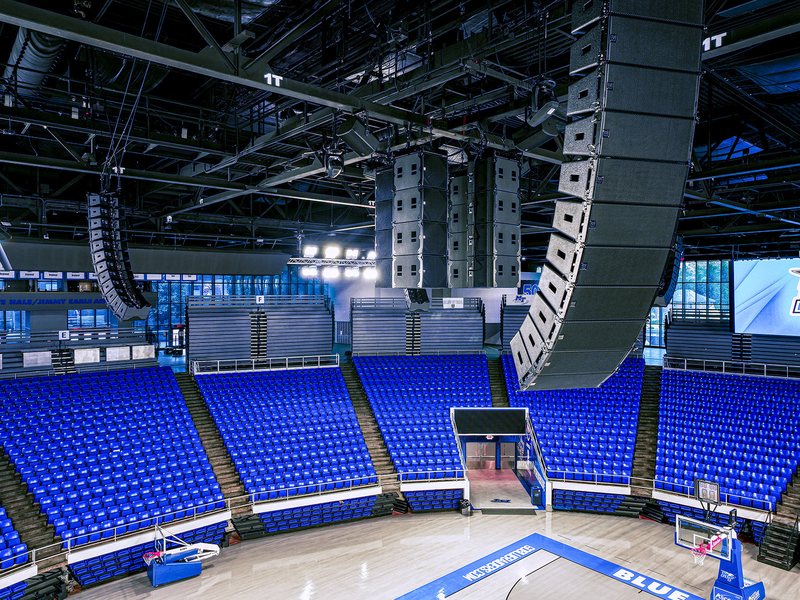
Murphy Center, MTSU
WPS and WPM · 11,520 seats · Spectrum Sound
A reverberant basketball arena with glass walls and retractable seating. Hard Avoid values were set for each seating configuration, and a 360° subwoofer array designed in DISPLAY 3 holds within ±2dB around 50Hz across the entire seating area.
“A major factor in choosing Martin Audio was its optimization technology.”
Built for Martin Audio DSP
What you see is what you hear, because DISPLAY 3 optimisation runs on Martin Audio DSP in iKON amplifiers, designed and tested alongside it.
That’s a deliberate choice. Keeping optimisation on our own DSP means every Wavefront Precision system delivers the result DISPLAY 3 predicted, wherever it’s installed or touring. FIR filters are not exported for use with third-party processors.
The workflow has three steps:

DISPLAY 3
Design and optimise in DISPLAY 3.

VU-NET
Export the snapshot to VU-NET.

iKON
Upload it to iKON amplifiers over Ethernet.
Coming from DISPLAY 2?
DISPLAY 3 takes a different approach in some areas, and each change is deliberate:
Constraints, not weightings
DISPLAY 2 let you weight Audience, Avoid and Hard Avoid by percentage, but biasing one target always affected the others. DISPLAY 3 builds the constraints into the algorithm itself, so the array gets as close as possible to every target at once.
Don’t Care
You can tell the algorithm where not to spend processing or headroom.
High-pass filter included
The line-array high-pass filter is part of the SPL calculation.
Audience heights by area
Each area can be standing, seated or a custom height.
Supported systems
DISPLAY 3 supports design and prediction across the Martin Audio portfolio, and optimisation for Wavefront Precision.
-
Prediction and optimisation
Wavefront Precision line array series
-
Prediction
Point-source and SX subwoofer series
ADORNBlacklineQBlacklineX PoweredCDDCDD-LIVEFlexPointTHTORUSSX
FAQ
DISPLAY 3 is Martin Audio’s free sound system design, prediction and optimisation software for Mac and PC. You import a venue from SketchUp or build one directly in the software, then place and predict Martin Audio point-source, line-array and subwoofer systems, with SPL results mapped onto a 3D model. For Wavefront Precision line arrays, DISPLAY 3 also calculates the array angles and FIR filters needed to deliver the coverage you’ve defined.
Look for accuracy you can verify against measured performance, and a workflow that takes you from venue model to deployed system. Accurate cabinet data matters, and so does the ability to import real venue geometry and see results across the whole audience. If the software optimises, check that what it predicts is what the system will deliver. DISPLAY 3 uses BEM acoustic modelling, imports from SketchUp, and is accurate to within ±1dB of measured performance.
Model the venue in DISPLAY 3 and compare the options side by side. You can place point-source, constant-curvature and line-array systems in the same venue and see how each one covers the audience in the 3D SPL map. Wavefront Precision line arrays can then be optimised to the coverage you define. For help choosing a system, our Application Specialists are available through Get Project Advice.
DISPLAY 3 lets touring engineers design, optimise and deploy a Wavefront Precision system quickly from one venue to the next. Optimisation typically takes under 20 seconds per array. You can save multiple snapshots for changes in audience size or weather, and air attenuation is adjusted for humidity and pressure. Rigging information exports to PDF, and optimised settings move through VU-NET to iKON amplifiers over Ethernet.
DISPLAY 3 lets consultants and integrators design a permanent system against the venue’s real geometry before anything is installed. You can import a detailed SketchUp model with its layers, assign coverage to seating and surfaces, and predict SPL across every audience area. You can design with point-source and line-array systems, and Wavefront Precision can be optimised to keep energy off walls and ceilings and away from the stage.
Line array optimisation means calculating the cabinet angles and DSP settings that give an array the coverage you want across the audience. Instead of relying on mechanical splay alone, the software adjusts the array’s output at each listening position so level and tonality stay even from front to back. In DISPLAY 3, Martin Audio Optimisation sets the angles first, then applies FIR filters to control phase, magnitude and SPL.
Martin Audio Optimisation delivers coverage, consistency and control while keeping the audio quality of the system intact. Its aim is precision and transparency, not processing every seat towards the same result. Constraints are built into the algorithm, so no target is chased at the expense of another. Mechanical angles are set first, so the FIR filters refine the result rather than rescue it. The algorithm evaluates 391 frequencies and is accurate to within ±1dB of measured performance.
Hard Avoid® is a coverage target in DISPLAY 3 for areas where level needs to come down sharply, by up to 30dB relative to the reference SPL. Typical uses are the stage, where it improves gain before feedback, and the space beyond an open-air audience, where it helps control off-site noise. It can also target a specific hard reflective surface. Use Hard Avoid once per deployment, with Avoid for other areas.
Even SPL depends on shaping the array’s output to the audience, not just pointing it at the back row. In DISPLAY 3, you set a reference SPL for the audience area and bias the level at the front and back to the profile you want. Martin Audio Optimisation then calculates the angles and FIR filters to deliver that profile, evaluating multiple listening points at varying distances, accurate to within ±1dB.
Throw distance depends on array length, trim height and cabinet angles, along with high-frequency loss through the air over distance. A longer array keeps control at lower frequencies, and the angles decide where energy lands. DISPLAY 3 accounts for all of these, including the distance and off-axis angle to every listening point and air attenuation adjusted for humidity and pressure. It then optimises Wavefront Precision arrays to reach the furthest seats without overpowering the front.
Large venues need coverage across long throws, steep seating tiers and highly reflective structures, often with off-site noise limits as well. Key factors include throw distance to the upper tiers, rigging positions and weight limits, roof and wall reflections, and changing audience size and weather. In DISPLAY 3, you can model the bowl from SketchUp, mirror arrays with the Symmetry Tool, and use Avoid areas to keep energy off the roof and structure.
Low-frequency control depends on how subwoofers are arranged, because their spacing and layout determine where bass builds up and where it cancels. DISPLAY 3 includes a subwoofer array tool for designing ground-deployed linear subwoofer arrays and predicting their coverage. For Wavefront Precision line arrays, optimisation also improves low-frequency control through FIR filters. Martin Audio’s online Subwoofer Calculator is available for further planning.
The most effective way to reduce off-site noise is to keep sound energy within the audience area and away from where it isn’t needed. In DISPLAY 3, Hard Avoid targets the space beyond the audience, reducing level there by up to 30dB relative to the reference. That helps events meet off-site noise limits, which are typically set by local licensing conditions, while keeping full level and quality for the audience.
In a reverberant venue, the key is to put sound onto the audience and keep it off reflective surfaces. Less energy hitting walls, ceilings and balcony fronts means less feeds the reverberant field, which improves clarity and intelligibility. In DISPLAY 3, Avoid areas mark these surfaces and reduce level on them by up to 20dB. Martin Audio Optimisation then concentrates coverage on the seating for Wavefront Precision systems.
No. DISPLAY 3 optimisation is built for Martin Audio DSP in iKON amplifiers, which is designed and tested alongside the software. This is a deliberate choice. It means every Wavefront Precision system delivers the result DISPLAY 3 predicted, wherever it’s installed or touring. Optimised settings move from DISPLAY 3 through VU-NET to iKON amplifiers over Ethernet.